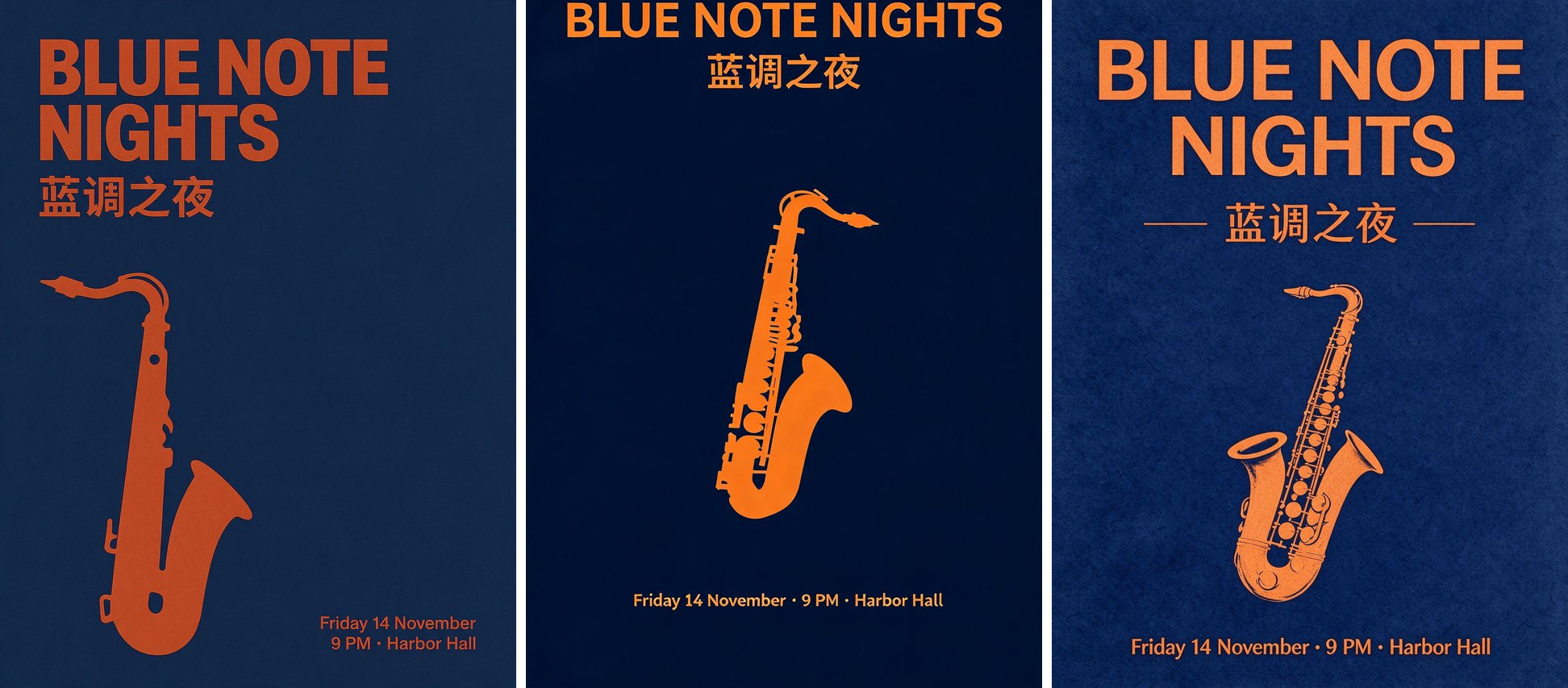
Seedream 5.0 comes in three versions: Pro, Lite and Flash. ByteDance describes what each one is for, but it doesn't publish the same prompt run through all three. So we ran that test ourselves. We used three prompts, three models and the same settings each time. Below are the full images, how long each one took and what each one costs.
How we tested
- Models:
seedream-5-0-pro,seedream-5-0-liteandseedream-5-0-flash, the same API models this site uses. - Settings: 3:4, 2K (every output is 1728 × 2304), one image per prompt, no reference images, no retries and no cherry-picking. Every image below is the first and only result.
- When: 1 November 2026. All nine jobs were sent at the same time.
- Time: seconds from sending the job to the finished image. It depends on server load, so treat it as a rough guide.
Each comparison shows Pro, Lite and Flash from left to right. Click any original to open the full 2K file.
Test 1: a typography poster
A minimalist jazz concert poster: a single saxophone silhouette in warm orange on deep navy, headline "BLUE NOTE NIGHTS" at the top, the Chinese line "蓝调之夜" under it, small text "Friday 14 November · 9 PM · Harbor Hall" at the bottom, clean Swiss print style.
All three models spelled the English headline, the Chinese line and the date correctly. That's the main result: none of them broke the text.
- Pro: a left-aligned Swiss layout. The date wraps onto two lines. It reads the most like a designer's poster.
- Lite: correct text, but the headline sits right against the top edge, so you'd want to crop or re-run it before printing.
- Flash: a centered layout with thin rules and a paper texture. It's clean and was ready in 14 seconds.
Test 2: a photoreal portrait
Candid 35mm photo of a 60-year-old fisherman mending a net on a wooden pier at dawn, weathered skin with visible pores and wrinkles, gray stubble, navy wool sweater, soft side light, shallow depth of field, natural colors, unretouched.
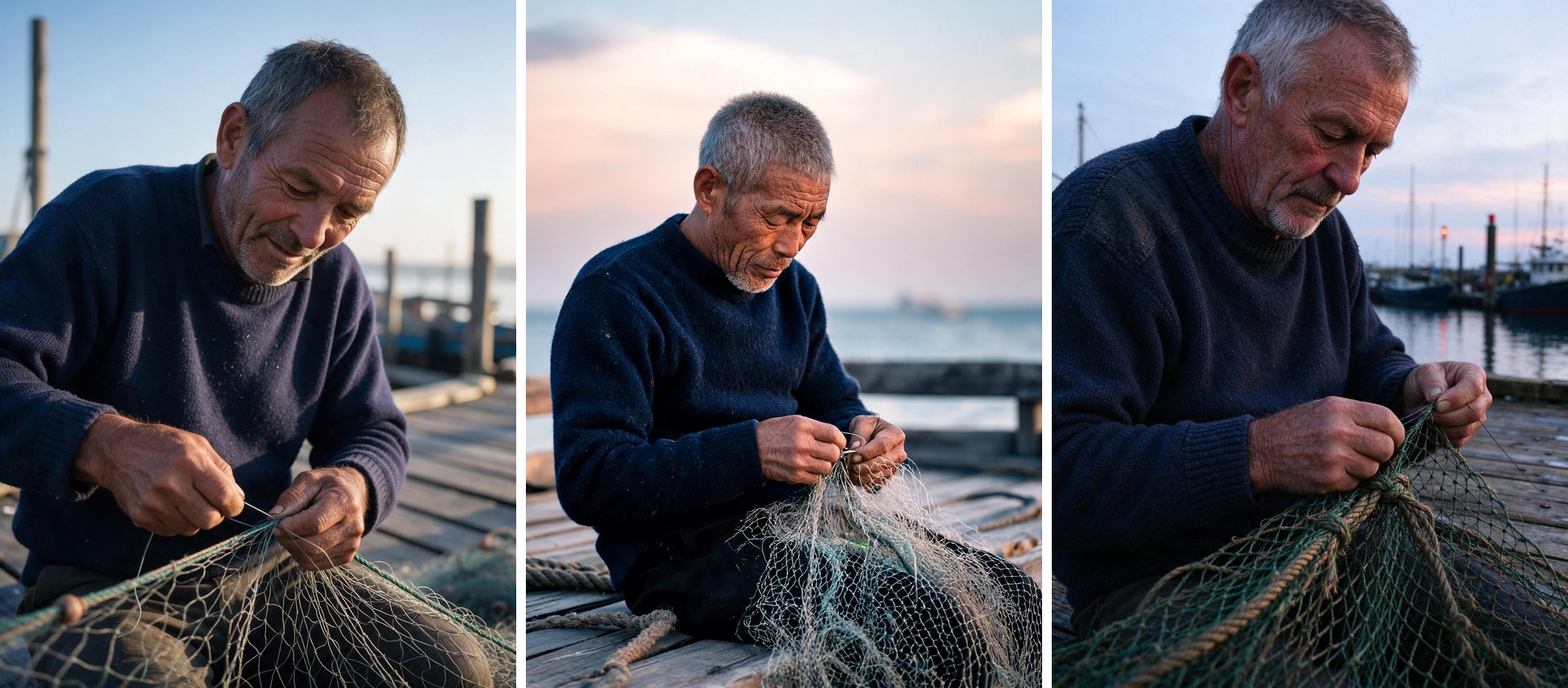
All three images look like photographs, with skin texture, stubble and a believable shallow depth of field.
- Pro: the most natural light and skin, and the closest match to "unretouched".
- Lite: chose an East Asian fisherman (the prompt didn't say) and a pink dawn sky. That's a fair reading of the prompt. If you need a specific look, say so in the prompt.
- Flash: photoreal at a glance. Compare it with Pro at full size before you use it for close-up work.
Test 3: a recipe infographic with exact numbers
A clean recipe card infographic titled "Matcha Latte": an ingredient list on the left (2 g matcha, 60 ml hot water, 200 ml oat milk, 1 tsp honey), four numbered steps with small line icons below it, a top-down photo of the latte on the right, soft beige background, all text legible.
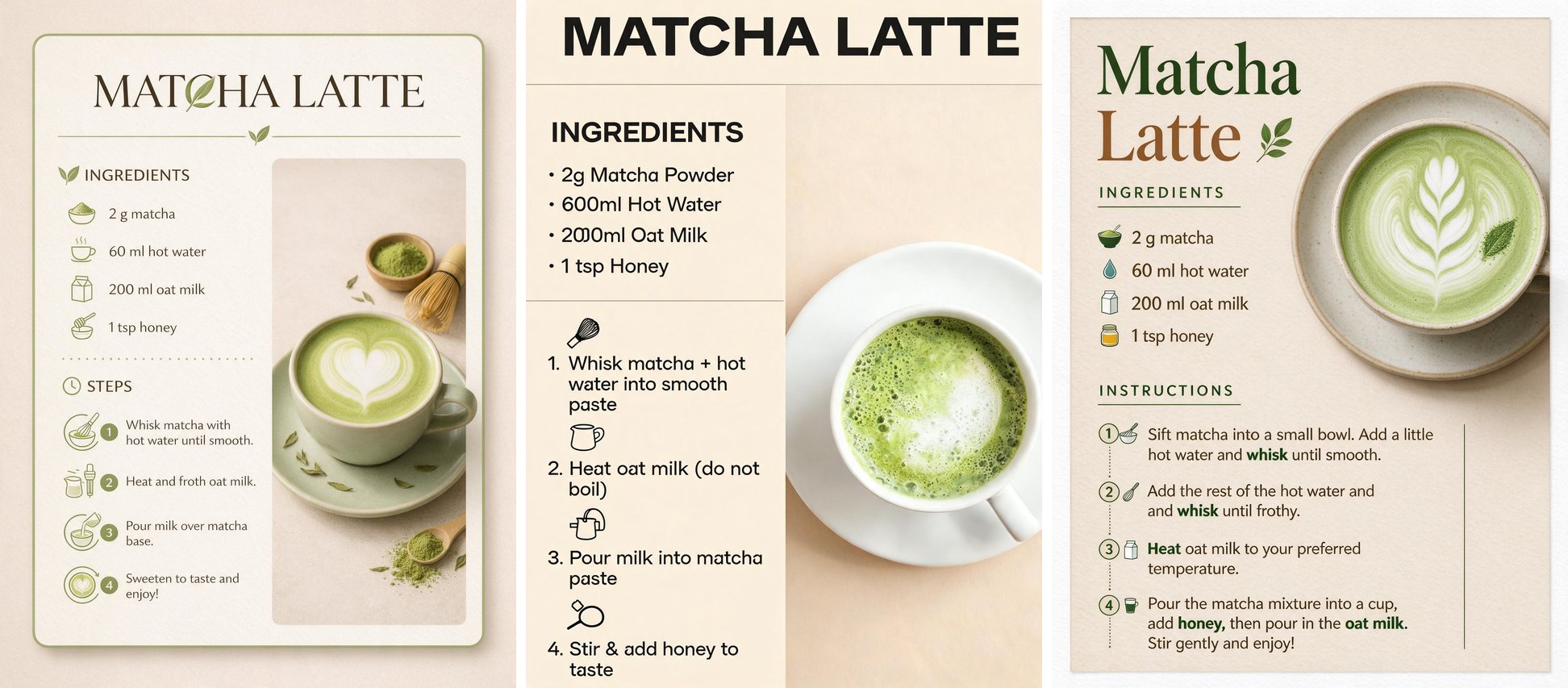
This was the hardest prompt: small text, four exact quantities and a layout. It's also the one where the models differed most.
- Pro: every quantity was correct. One quirk: it replaced the "C" in "MATCHA" with a leaf, which a designer might like and a strict proofreader wouldn't.
- Lite: got numbers wrong. It wrote "600ml Hot Water" instead of 60 ml and a garbled "2000ml" for the oat milk.
- Flash: the quantities were right, but step 2 says "and and whisk". It's fast and cheap, but proofread it.
Timings and price per image
Times are from this run (2K, 3:4). The list price is BytePlus ModelArk's, ByteDance's own API. The site price runs from the smallest credit pack to the largest.
| Model | Poster | Portrait | Recipe | BytePlus list price (2K) | Price on this site (2K) |
|---|---|---|---|---|---|
| Seedream 5.0 Pro | 79 s | 38 s | 80 s | $0.09 | $0.33 → $0.28 (10 credits) |
| Seedream 5.0 Lite | 49 s | 64 s | 33 s | $0.035 | $0.13 → $0.11 (4 credits) |
| Seedream 5.0 Flash | 14 s | 16 s | 20 s | $0.018 | $0.07 → $0.06 (2 credits) |
Pro at 1K costs 5 credits ($0.17 → $0.14), and BytePlus lists it at $0.045. If you plan to generate thousands of images and can write code, ByteDance's API is cheaper per image. This site is meant for people who want a browser editor, one-time packs with no subscription, and credits back automatically when an image fails.
Which one should you use?
- Seedream 5.0 Pro for anything with exact text or numbers, careful edits and close-up portraits. It was the only model with no wrong quantity in our test.
- Seedream 5.0 Lite when you need 4K output or up to 10 reference images. Check any numbers in the result.
- Seedream 5.0 Flash for drafts and layout ideas. It was 2–6× faster than Pro in this run and costs a fifth as much at 2K.
Limits of this test
There was one run per prompt, so you're seeing typical output, not each model's best. We didn't fix a seed, so running the same prompt again will give a different image. We'll add more tests here, including editing and multi-image references.
Try the same prompts
Every prompt above is in plain text, so you can copy it and run it in the generator. New accounts get free credits, enough for four Pro images at 1K, and you can switch models without losing your prompt.
Read more
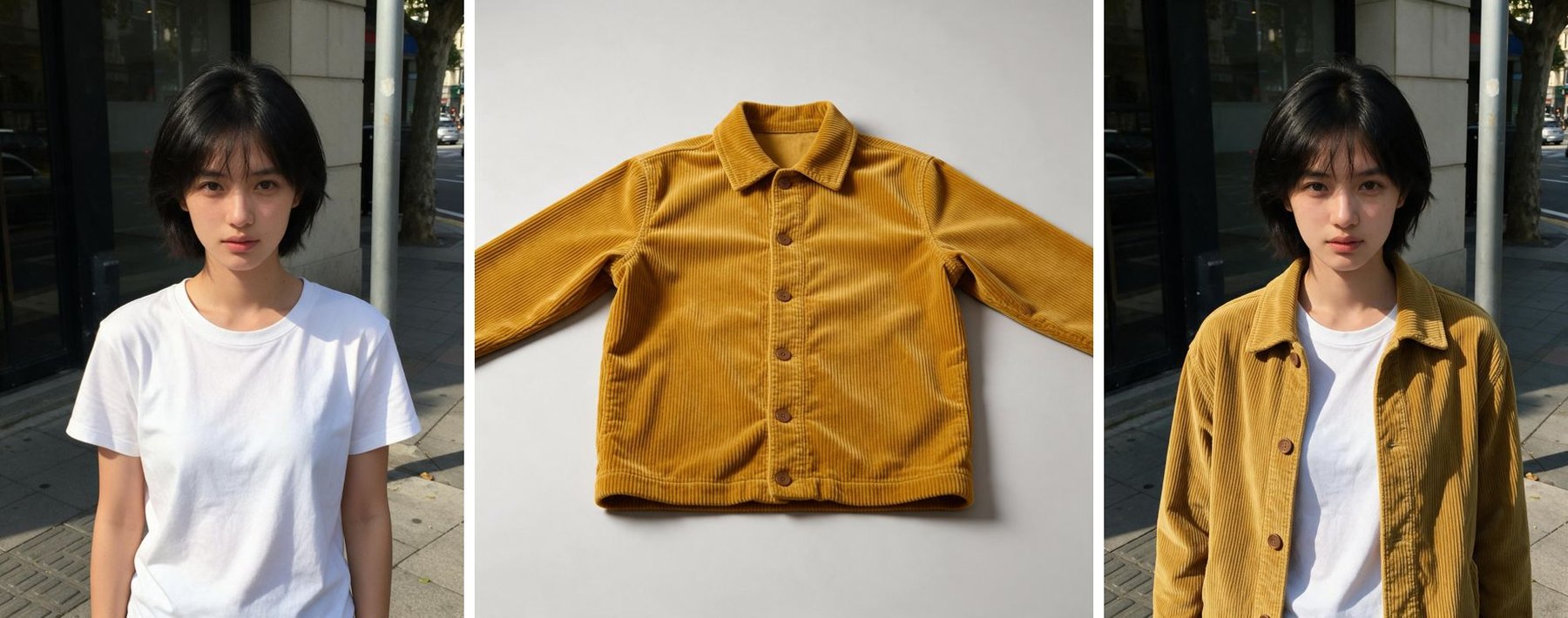
How to Change Clothes in a Photo With AI and Keep the Face (Seedream Tutorial)
A tested, step-by-step outfit swap with Seedream 5.0 Pro: two input photos, the exact prompt we used, the result, and tips that keep the face, pose and background unchanged.
Is Seedream 5.5 Out? Where You Can Actually Use It (November 2026)
Seedream 5.5 is only in ByteDance's Dreamina app for now, with no public API. Here's where it runs, what the API options cost for Seedream 5.0, and how to check whether a site really runs 5.5.